
SMS priorities
By default, there is no priority management of SMS text messages in Ozeki SMS Gateway. However, it is possible to affect in which order messages should be sent out. To do so you need to be familiar with send message algorithm.
Send message algorithm
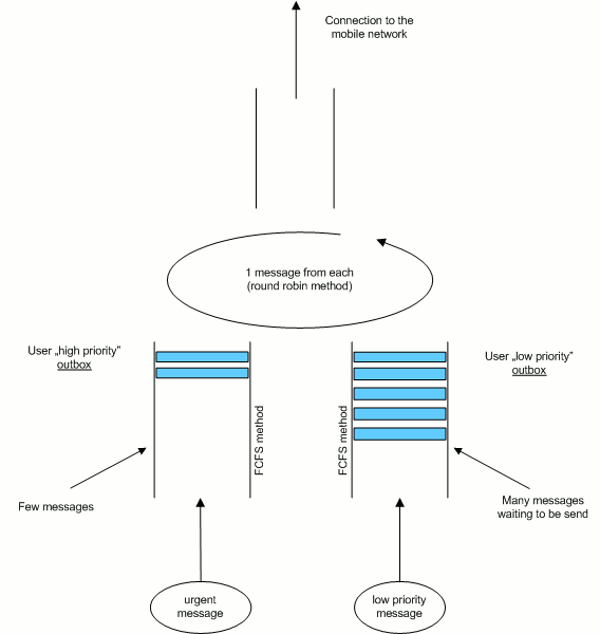
In Ozeki SMS Gateway each of the users has separate waiting queues. Messages that need to be sent out will be forwarded into these waiting queues called Outbox. From the Outbox of a given user, SMS text messages will be sent out on FCFS (First Come First Served) principle.
In case of two or more users, all of them have the same priority access to the send message channel. In practice it means that regardless of how many messages of each user are waiting for to be sent out, the program will select one message from each user in one round. This algorithm is called Round Robin algorithm.
How can you affect sending order
To be able to affect the order of message sending it is recommended to create two user accounts in Ozeki SMS Gateway. In this way, low-priority messages will be sent out via the first user account, and high-priority messages will be sent out via the other user account.
If it is assumed that there are lots of low-priority messages and only a few high-priority messages, then with this method you can provide priority to the urgent messages. Higher priority results from the fact that urgent messages do not have to wait until the program sends out all the low-priority messages that arrives before urgent ones. Therefore, messages with high priority can be sent out first (Figure 1).
FAQ
How to configure high priority for API OTP SMS?
High Priority OTP SMS messages are critical for user authentication, as delays in delivery can result in expired codes, failed login attempts, and a poor user experience. By routing OTP messages through the high‑priority queue, you minimize latency and ensure users receive their verification codes promptly.
You can control the order in which Ozeki SMS Gateway sends messages by using separate user accounts with different priorities. Do the following:
- Create the first user account – this will be used for low‑priority traffic.
- Assign it to a low‑priority queue (or set its priority level to low)
- Create the second user account – this will handle high‑priority traffic.
- Assign it to a high‑priority queue (or set its priority level to high)
When messages are submitted through the high‑priority user account, Ozeki SMS Gateway will process them before any messages from the low‑priority account, ensuring that important SMS messages are sent first.