
SMS MCP Server for Kimi CLI
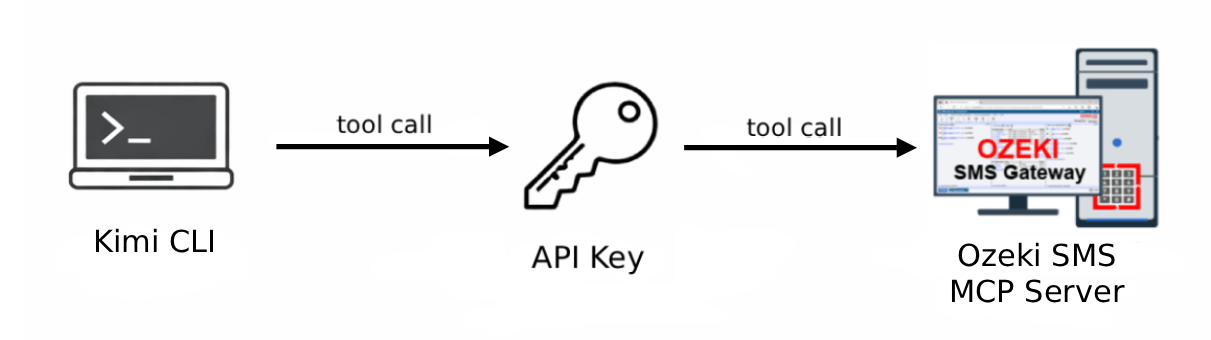
The Ozeki SMS MCP Server integrates with Kimi CLI to bring SMS messaging capabilities directly to your terminal. Learn how to configure the MCP connection, send outgoing SMS messages, and retrieve incoming messages using plain language prompts through your AI-powered command-line assistant.
What is Kimi CLI?
Kimi CLI is a command-line interface tool that enables developers to interact with Kimi AI directly from their terminal. It provides an agentic coding experience where you can delegate programming tasks, file operations, and code generation without leaving your command-line environment.
How to configure the Ozeki SMS MCP Server in Kimi CLI
Learn how to integrate the Ozeki SMS MCP Server with Kimi CLI using mcp-proxy for MCP version compatibility. This tutorial guides you through editing the mcp.json configuration file with your gateway address and API key, starting Kimi CLI, and verifying the MCP server connection.
How to configure the Ozeki SMS MCP Server in Kimi CLIHow to set up an SMS MCP server to send SMS from Kimi CLI
Discover how to send SMS messages from Kimi CLI using the Ozeki SMS MCP server. This guide shows you how to verify the MCP server connection, instruct the AI agent to send an SMS using a plain language prompt, and confirm successful delivery through the Ozeki SMS Gateway event logs.
How to set up an SMS MCP server to send SMS from Kimi CLIHow to set up an SMS MCP server to receive SMS in Kimi CLI
Learn how to retrieve incoming SMS messages in Kimi CLI using the Ozeki SMS MCP server. Verify the connection, instruct the AI agent to list messages in plain language, and confirm the transaction through gateway logs.
How to set up an SMS MCP server to receive SMS in Kimi CLI