
SMS MCP Server for OobaBooga
The Ozeki SMS MCP Server integrates seamlessly with Oobabooga Text Generation WebUI, enabling AI models to send and receive SMS messages through plain language prompts. Follow the guides below to configure, send, and retrieve SMS messages from your locally running models.
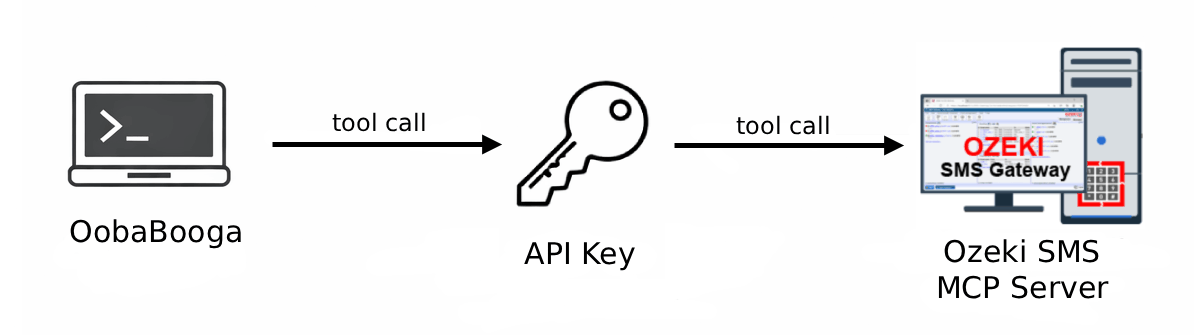
What is Oobabooga?
Oobabooga Text Generation Web UI is an open-source web interface for running large language models locally on your own hardware. It supports a wide range of model formats and backends including llama.cpp, as well as GPU-accelerated inference for NVIDIA and AMD graphics cards.
How to configure the Ozeki SMS MCP Server in Oobabooga
Learn how to integrate the Ozeki SMS MCP Server with Oobabooga Text Generation WebUI. This guide shows you how to locate the MCP server field in the sidebar, enter the connection URL and API key, and verify that SMS tools are available for use.
How to configure the Ozeki SMS MCP Server in OobaBooga TextGenHow to set up an SMS MCP server to send SMS from Oobabooga
Send SMS messages directly from Oobabooga Text Generation WebUI using the Ozeki SMS MCP server. Simply verify the MCP connection, type a plain language prompt to send a message, and confirm delivery through the gateway event logs.
How to set up an SMS MCP server to send SMS from OobaboogaHow to set up an SMS MCP server to receive SMS in Oobabooga
Retrieve incoming SMS messages in Oobabooga Text Generation WebUI using the Ozeki SMS MCP server. This tutorial guides you through verifying the MCP connection, asking the AI model to list incoming messages in plain language, and confirming the transaction through the Ozeki SMS Gateway logs. Add SMS inbox access to your Oobabooga workflow.
How to set up an SMS MCP server to receive SMS in Oobabooga